Joao Alves
Senior Engineering Manager at IndeedFlex
Redrawing the Home Screen
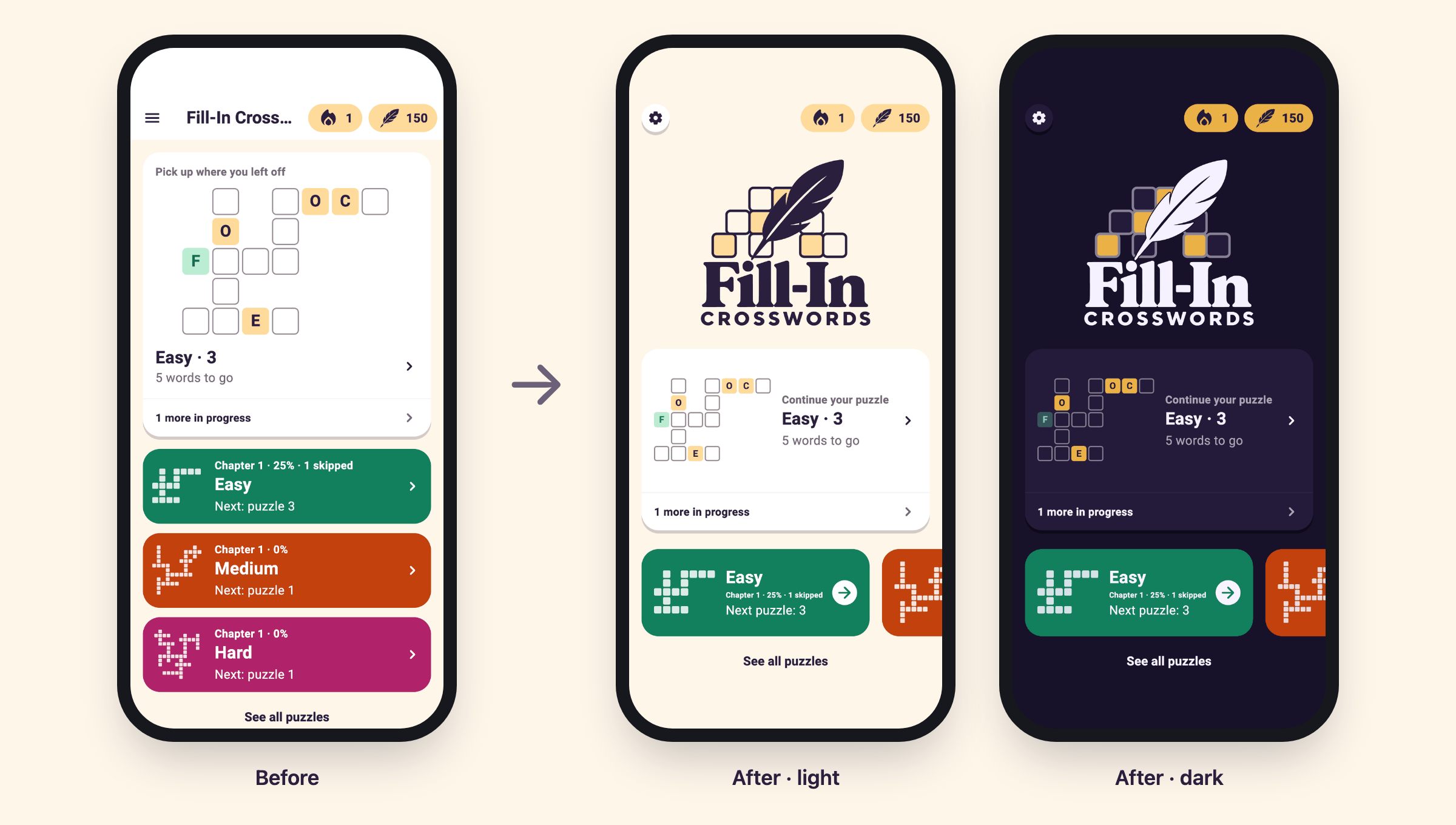
I spent the weekend redesigning the home screen of my word game, Fill-In Crosswords, while a couple of test builds are out with some friends that volunteered to validate the game’s difficulty. Some of their feedback is already leading to changes, more on that in a future post 🧪
The cover image above shows the before and after: where Home started, and where it ended up in light and dark mode. Below I try to share some of the journey in between.
The name didn’t fit 📐
The first iteration of the Home screen served its purpose. It looked nice and simple. A toolbar with the game’s name, a card to pick up the puzzle in progress, and a card for each of the Easy, Medium and Hard tracks.
Then the game started to grow. The play streak from last week’s stats work needed a home, and so did Quills, the currency players earn by solving puzzles and spend to reveal letters or skip a puzzle (part of a bigger game economy I’m still working on, more on that in a future post as well).
The streak and Quills both went into the right side of the toolbar as little pills with the settings menu moving left. That meant the app name didn’t fit anymore. “Fill-In Cross…” didn’t feel like the best first impression. The screen also felt a bit naked at times, and there was no branding anywhere 😕
Asking the robots for ideas 🤖
I’m picky with design but building it myself is not a strength, as you know 😅 So time to ask the robots for some ideas. I decided to use ChatGPT as I feel it’s stronger than Claude for this type of tasks.
The brief was simple: bring in a game logo, lose the toolbar look so the page feels like one surface, and turn settings, streak and Quills into floating buttons at the top.
For the rest of the screen I kept it open. The logo would likely push everything down, so I just asked for ideas on how to rearrange things, whether that meant scrolling the tracks horizontally, stacking them vertically or something else entirely.
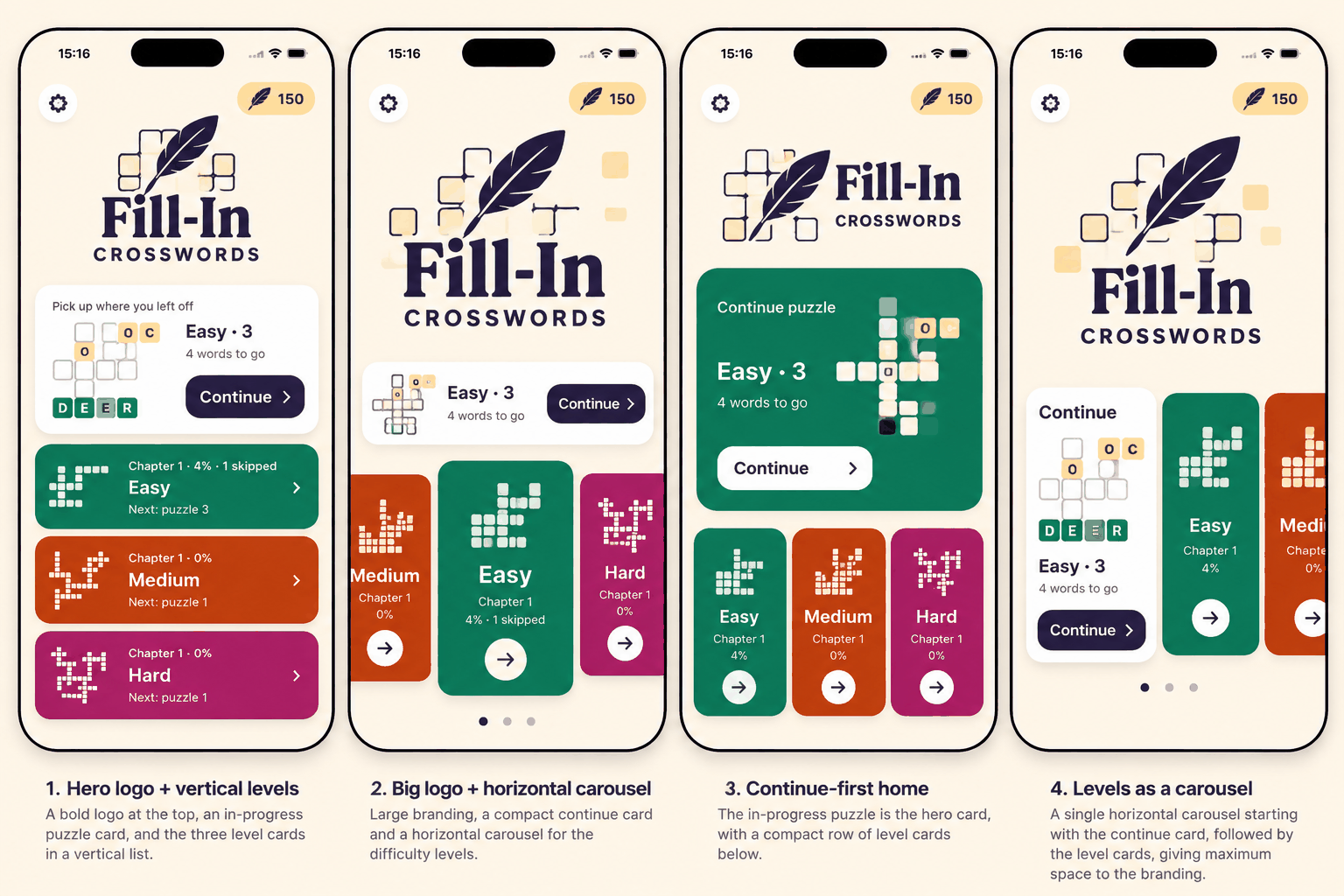
It came back with four different ideas. None of them had everything the game actually needs, but together they gave me a nice direction to start from.
A logo that can change colours 🪶
First the logo. It also came from ChatGPT as it had nailed some of the branding for me before, better than Claude. It made it as a PNG first, then I asked it for an SVG version. The game is going live with light and dark themes, and the idea is to add more themes later.
An SVG can easily be adapted to any theme, which will make things much easier in the future. No need to produce new PNGs every time and risk them coming out slightly different, as AI isn’t perfect with those.
The SVG version from ChatGPT wasn’t great though. It looked squashed vertically and stretched horizontally. It was a trace of the PNG, and the tracing had messed up the borders of the grid squares, leaving some of them wonky and uneven, and with a few other issues.
Time to switch to Claude to see if it could do a better job. I asked it to give it a go and build a new SVG from the PNG file. It accepted the challenge and redid it a different way. Instead of tracing the whole image again, it drew the SVG itself, measuring where everything sits in the PNG and rebuilding each part from that.
Then it compared the result with the PNG pixel by pixel to make sure they matched. It came out really nice but let’s be honest, I have no idea how either process works under the hood. 😅
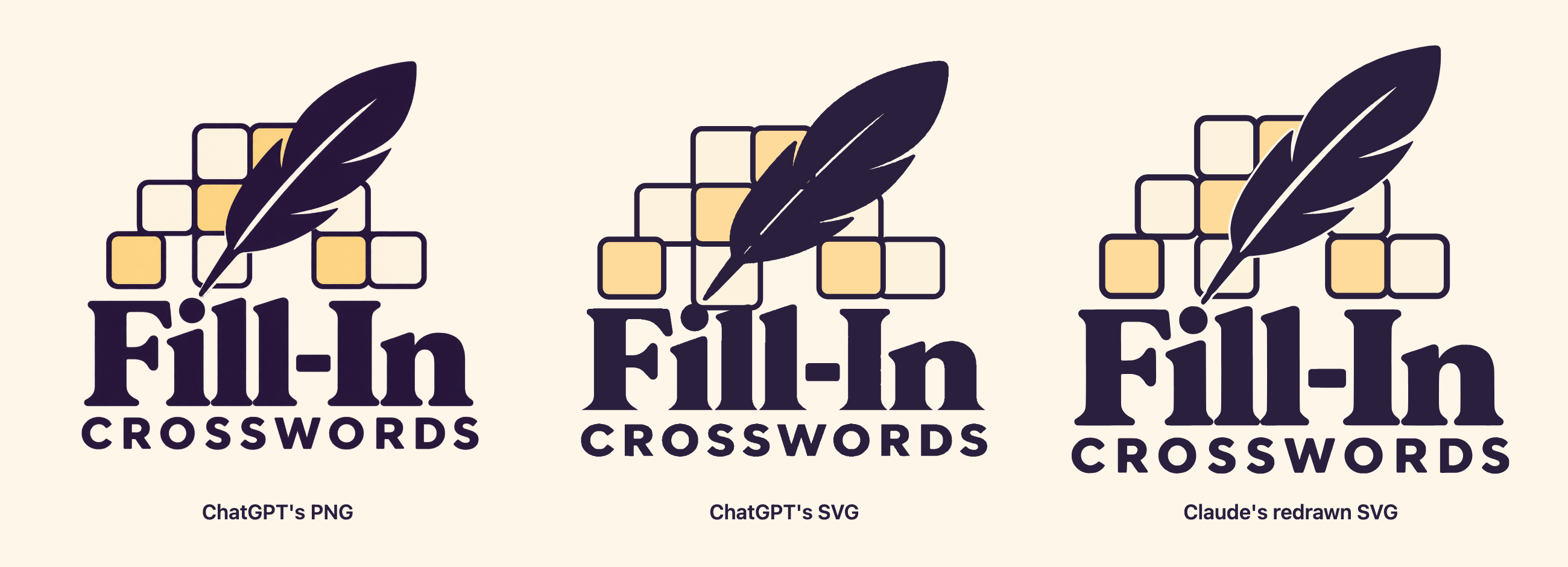
Most importantly, it does what I needed the SVG for. The dark mode logo in the cover image at the top is the exact same file, just with the theme’s colours swapped in 🎨
Building the actual screen 🛠️
Then it was time to build the actual screen with Claude Code. My first ask was a mix of explorations 1 and 2: a logo that’s not gigantic, a more horizontal in-progress card, and the tracks in a horizontal scrollable row, starting at the left edge and going from Easy to Hard.
The first version wasn’t bad, but it took a few rounds to get to where I wanted it.
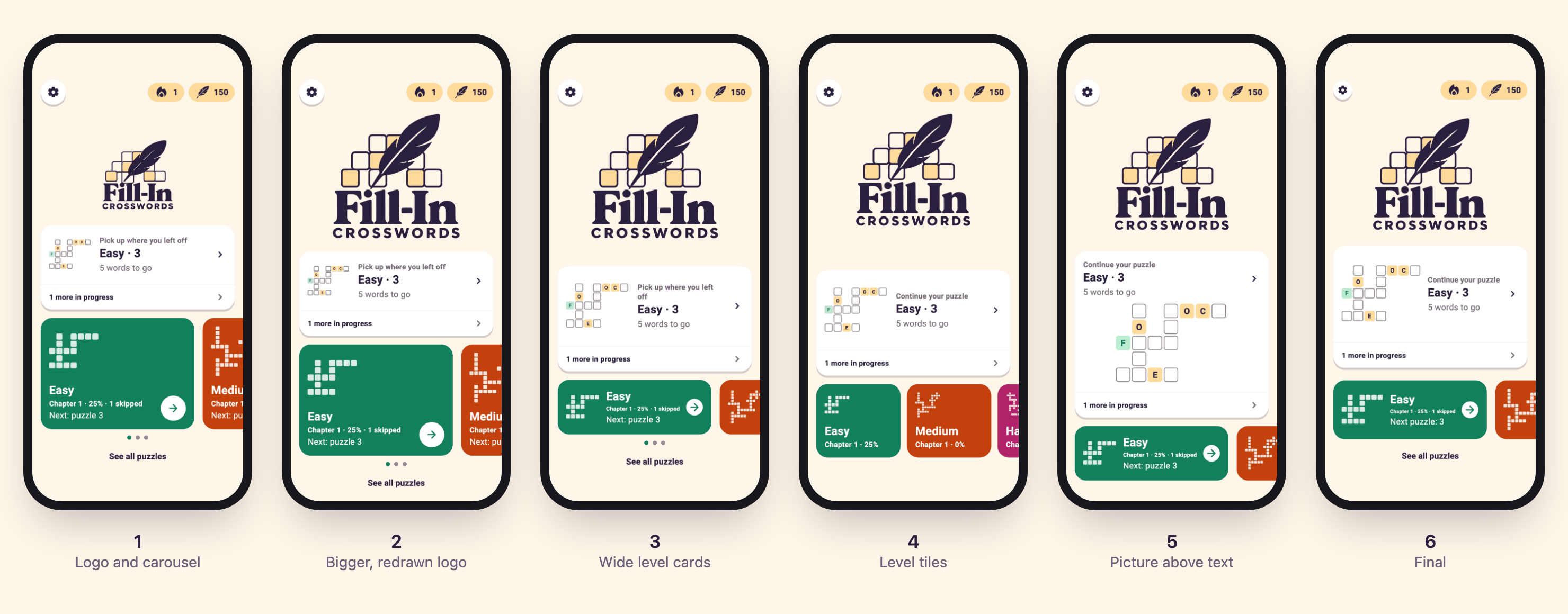
The first build (1) had the logo, the new settings floating button and the tracks carousel, but the logo looked too small and a bit squashed. That’s where the SVG problem from above showed up, so once it was redrawn it also got bigger, to become the highlight of the screen that it should be (2).
The track cards are where I got stuck the longest. It took a few attempts and some back and forth before nailing the final version. They started tall and square-ish, with lots of empty space next to the grid, so they became shorter and wider with the text beside the grid (3).
I then tried small square tiles that opened each track’s puzzle list instead of the next puzzle (4). This way they wouldn’t compete with the Up Next card and could replace the See all puzzles link. But they had no room for details like skipped puzzles or the next puzzle number, so it was back to wide cards again, opening the next puzzle.
The board grid on the Up Next card also needed a few tries. At first it was too small to read. Putting it below the text (5) fixed that, but the card then took almost all the space left on the screen. In the end, it went back beside the text, just big enough to read (6).
At one point I also considered dropping the track cards and having the Up Next card handle everything. I dropped that idea though, since special packs of puzzles will probably become a thing later and they’ll need somewhere to live 👀
One card, many states 🧩
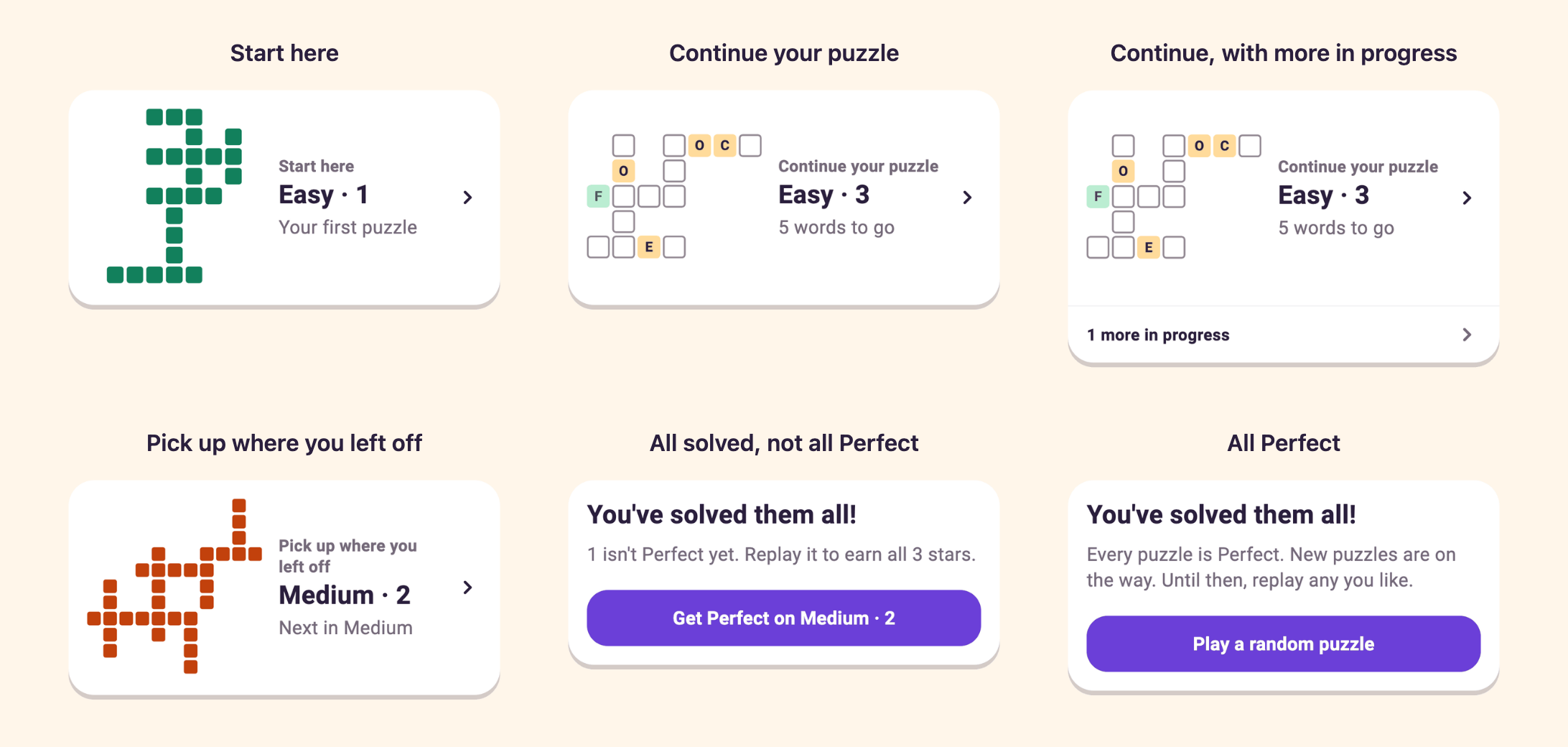
The Up Next card is where most of the thinking went after. Before, it only showed when a puzzle was in progress or when every puzzle was solved. Now it’s always there, in the same place, and it changes depending on where the player is:
- “Start here”: for a new player, it opens the first puzzle in the Easy track.
- “Continue your puzzle”: with a puzzle in progress, it opens the most recent one, with a link to any others.
- “Pick up where you left off”: with nothing in progress, it opens the next puzzle in the track the player played last.
- “Get Perfect”: once every puzzle is solved but some aren’t Perfect yet, it opens the first of those to replay.
- “Play a random puzzle”: once every puzzle is solved and all are Perfect, it opens a random one to replay until new puzzles arrive with an app update.
Wrapping up 💭
The Home screen is signed off for now. Not to say it won’t change later. I decided to add some analytics to see how players get into puzzles, through the Up Next card or by heading to a specific track. If lots of players go straight to Medium or Hard, that might be a reason for a different UX that doesn’t hide those tracks behind a swipe.
In the meantime, I’ll keep tuning the difficulty model with the feedback I’m getting from my difficulty test builds. Hopefully I’ll have something to share on that soon 🙂